
Superspin Casino Registration
Superspin registration takes 2 to 3 minutes, with your profile created directly on superspin-ca.com. Keep a working email address or mobile phone handy so we can confirm your contact details. We allow one account per person. Players in Canada should prepare accurate personal information before starting, then follow each prompt without rushing through choices that affect future access.
Before You Register at Superspin Casino
Prepare for Superspin registration by checking eligibility before entering any details. Players in Canada must be at least 19. Have an internet-connected device and access to whichever email or phone you provide. Use real information that matches supporting documents, rather than a nickname or someone else’s details. An existing membership means you should recover access instead of opening another profile. Choose contact details you control personally, so confirmation messages reach you directly.
Beyond joining, Superspin registration gives you a starting point for games, deposits, withdrawals and support. Players across Canada should approach gambling as paid entertainment within a planned budget. Decide what feels affordable before browsing titles or arranging a payment. Leave essential spending untouched, and stop when that entertainment allowance runs out. Support is available for questions about joining or using our site, but no gambling session should become a way to cover bills or chase previous losses.
How to Register at Superspin Casino
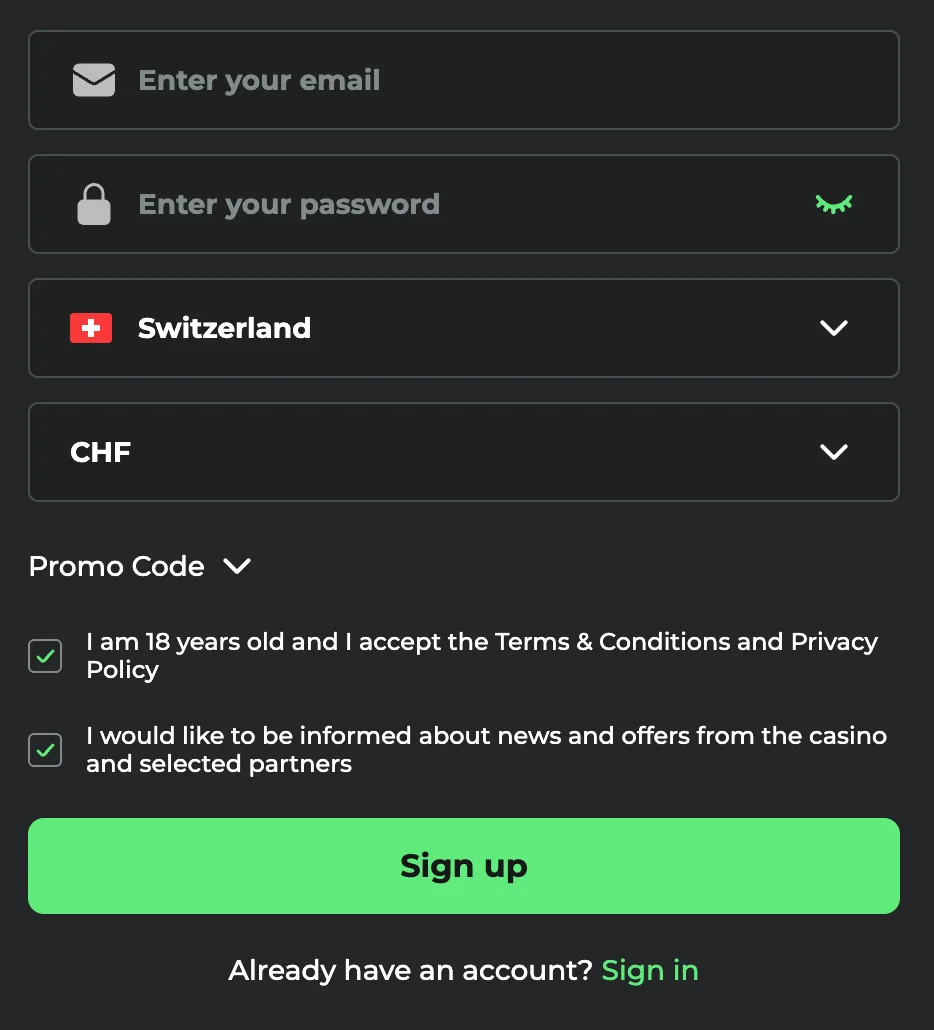
Complete Superspin registration through our website, keeping each entry accurate from the outset. Players in Canada using a mobile number should enter it in international format, such as +1 416 555 0123. Read each prompt before continuing, especially selections that establish how future transactions will appear.
- Type superspin-ca.com directly into your browser.
- Open registration to begin.
- Fill in your email or phone and create a password.
- Choose Canadian dollars and Canada as your currency and country. Currency cannot be changed later.
- Confirm age eligibility and accept our terms after reading them.
- Use the confirmation code or link we send, then sign in.
Check your browser’s address before submitting anything sensitive. Fake copies exist, so a familiar appearance alone does not establish that a website is ours. Read the domain carefully rather than relying on a logo. If an address looks different, close that page and return through the domain typed directly into your browser.
Data You Provide
Our opening form collects contact and access details, while identity information comes later during checks. Keep these stages distinct when preparing what to enter. A reachable inbox or handset lets us confirm contact ownership; personal records establish who holds the membership. The table sets out requirements for each field without asking you to send supporting files during initial sign-up.
| Data | When We Ask | Requirement |
|---|---|---|
| Email or phone | Sign-up | 6-digit code valid for 15 minutes |
| Password | Sign-up | At least 8 characters, including 1 letter and 1 number |
| Currency | Sign-up | 1 currency per account |
| Country | Sign-up | 1 country per account |
| Name and date of birth | Verification | Legal identity and eligible age |
| Address | Verification | Proof no older than 3 months |
Details that conflict with supporting records need correction before identity checks can be completed. Do not solve a mismatch by starting again under another identity. Compare spelling, birth details and residential information carefully, then explain any discrepancy through support. Accurate entries keep later checks focused on confirming ownership rather than resolving avoidable inconsistencies.
Account Verification at Superspin Casino
Identity checks follow Superspin registration and connect personal details with their rightful holder. We ask for ID and address verification, with requirements varying by province. For players in Canada, that means preparing records relevant to their residence rather than borrowing someone else’s paperwork. Treat this stage as confirmation of information already supplied.
A valid, unexpired Canadian passport or driver’s licence provides photo identification. A utility bill or bank statement provides evidence of residence. Photograph complete pages clearly, keeping corners visible and text readable. Avoid glare, shadows and cropped edges. Documents issued in Canada should show details matching those entered during sign-up.
Completing Superspin registration does not replace these checks. Verification is required once, before the first withdrawal, and review takes from a few hours to 3 business days. Submit clear records together rather than sending unreadable fragments. While we review them, keep access to your chosen contact method so any request for clarification reaches you.
Steps After Registration
After Superspin registration, take a moment to review settings before moving into play. A deliberate start helps separate administrative choices from entertainment spending. Work through these actions in order, giving particular attention to personal details, affordability and the amount of time you intend to spend browsing or playing.
- Review your profile. Sign in and inspect saved personal information. Resolve mistakes before proceeding with financial activity.
- Consider our welcome package. Once you have completed all the steps, you can take our welcome bonus: up to C$9,000 + 525 Free Spins. Full conditions are in the bonus section of superspin-ca.com.
- Plan any first deposit. Stay within an amount already allocated for entertainment. Leave household expenses and savings outside that decision.
- Explore a few games. Begin with a small selection rather than moving quickly between many titles. Read their rules before wagering.
- Set personal boundaries. Establish time and money limits before playing. Visit our responsible gaming page for information about managing gambling.
Gambling is entertainment, never income. Stop when play stops feeling recreational, even if a planned session remains unfinished. For independent help in Canada, contact the Responsible Gambling Council. Seeking support is a practical response to concerns about spending, time or control, not something to postpone until problems become severe.
Account Security at Superspin Casino
Protecting access starts with Superspin registration and continues whenever you return. Keep login information separate from details shared socially or used on unrelated websites. Personal control over contact channels matters too: anyone reading incoming confirmation messages could interfere with access, so treat those messages as private information.
- Choose a strong, unique password.
- Never share confirmation codes.
- Sign out after using shared devices.
- Type superspin-ca.com yourself.
- Keep contact details current.
We never ask for your password by message. Treat any such request as a reason to stop communicating, rather than an instruction to follow. Avoid forwarding screenshots containing private access details. If something looks suspicious, describe what happened without revealing credentials or giving another person control over your session.
Troubleshooting Superspin Casino Registration
Problems during Superspin registration include typing mistakes, missing confirmation messages, weak credentials, incorrect country or currency selections, age restrictions and duplicate memberships. Identify which stage stopped progressing before trying again. Repeated attempts without correcting an entry do not resolve its underlying problem. An existing profile calls for access recovery, not another application.
For help with Superspin registration, first reread entries, inspect your spam folder and confirm that incoming texts reach your handset. Correct visible mistakes before requesting assistance. If the difficulty continues, write to support@superspin-ca.com with the step involved, what appeared onscreen, your device and browser. Describe any error wording accurately so we can understand where progress stopped. Never send a password, even when explaining trouble signing in.
Last updated: